



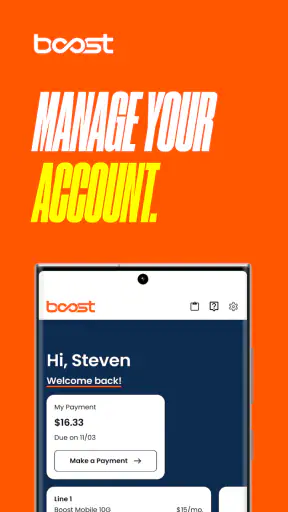
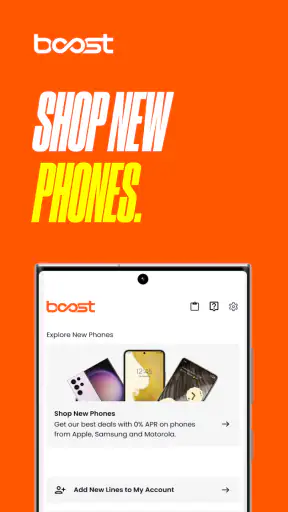
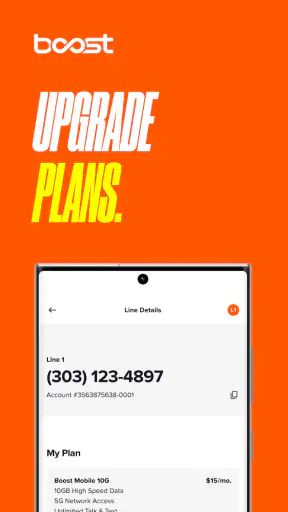
Boost Mobile is the kind of communication app I open when I need to deal with my mobile service rather than chat with another person. Its job is practical: it gives Boost customers a place to manage their account, check service details, and handle routine tasks without relying entirely on a browser or a phone call. I found that focus useful because it keeps the experience centered on the information I am most likely to need when my service is active, my bill is approaching, or something about my account needs attention.
Developed by DISH Wireless L.L.C., this free app is aimed at Boost Mobile customers and is listed for everyone. It has built a sizeable audience, with more than five million installs and an average rating of 4.6 from roughly three hundred ten thousand ratings. Those figures suggest that the basic account-management experience works well for many people, although they should not be mistaken for a guarantee that every account issue will be easy to solve inside the app.
How Boost Mobile feels to use in everyday account management
Readable navigation for routine tasks
My first impression is that Boost Mobile makes more sense when I treat it as a service-control panel, not as a full replacement for every form of customer support. The store summary, “Manage BoostMobile Account,” is a fair description of its purpose. I would open it to review my mobile account, keep an eye on service-related information, and avoid searching through old messages or a desktop website for something I may need while away from home.
That narrow purpose is also one of its strengths. A focused account app can be less intimidating than a general customer portal filled with unrelated links. If I am helping a family member who only wants to understand their Boost service, a dedicated app is easier to explain than a browser session with several tabs and unfamiliar menus. The important test is not whether it offers endless options, but whether the next useful action is apparent.
Text readability matters more than many people expect in a mobile account tool. I found it best to use the app when I had enough time to read labels carefully instead of tapping quickly through screens. Account information, service choices, and payment-related steps can have consequences, so a clear pause before confirming anything is valuable. I would not recommend rushing through the interface while distracted, especially if I am changing something that affects another person on a shared account.
A practical habit is to open the app before I actually need it. That lets me become familiar with where the important account areas are while the phone is working normally. If I wait until service is interrupted or I am standing in a checkout line, even a straightforward layout can feel harder to follow. This is a small but useful difference between occasionally installing an account app and making it part of a reliable routine.
The current version is 4.1.22, and the app supports Android 8.0 or later. That makes it relevant to people who keep an older Android phone instead of upgrading frequently. Still, compatibility is not the same as comfort. A phone with a small display, an aging battery, or a slow connection may make account tasks feel more demanding than they would on a newer device.
Helpful for people who prefer visual self-service
I see the strongest fit for customers who would rather inspect their account themselves than explain a problem over the phone. A visual account view can be useful for someone who likes to compare what they remember with what is shown on screen. It can also give a more private way to review service information in a quiet place, which is preferable to discussing account details aloud in a crowded room.
There is a subtle advantage for people who need to work at their own pace. A phone conversation moves forward in real time, while an app lets me stop, reread, and return to a screen when I am ready. That can help users who process written information more comfortably than spoken instructions. It is also useful when English is not the user’s first language, provided the available wording is familiar enough to understand.
At the same time, a visual interface is not automatically inclusive. Small text, low contrast, crowded controls, unclear error messages, or a process that resets after a mistake can turn self-service into extra work. I would judge Boost Mobile on the actual screen in front of me rather than assuming that a mobile app is easier for everyone simply because it is digital.
Motor and sensory considerations
For users with limited fine-motor control, the main question is how forgiving each interaction feels. Account apps often involve tapping a specific control, entering information, reviewing a choice, and confirming it. I prefer to perform those steps while seated and with the phone supported, rather than trying to manage them one-handed on a moving bus. That advice is not a criticism of this app alone; it reflects the higher stakes of account changes compared with casual browsing.
A person with tremors or reduced reach may find repeated navigation tiring, particularly if a task requires moving back and forth between screens. In that situation, I would prepare the needed account information first and complete one task at a time. Keeping the phone’s system text size and display settings comfortable can also make the experience more manageable, although enlarged system text may cause some screens to show less information at once.
For users with low vision, the most useful approach is to test the app with the phone’s normal accessibility settings before depending on it. Larger text, screen magnification, and a stronger display contrast can help at the device level, but they may also create a trade-off: a layout that looks spacious at the default size can feel crowded when text is enlarged. I would not assume that every control remains equally easy to identify under every display setting.
People who are sensitive to visual clutter may appreciate using the app for one clear purpose at a time. I would avoid opening it alongside several other demanding apps and would check account information in a calm environment. For a user who relies heavily on a screen reader, voice control, switch access, or other assistive technology, the sensible step is to test the specific account workflow before committing to the app as the only way to manage service. The app’s general availability does not prove that every screen works equally well with every assistive setup.
Hearing-related needs are less central to an account-management tool than they are to a calling or video app, but they still matter when support is needed. If an account problem cannot be resolved through the app, a user who cannot comfortably use voice support should plan an alternative communication route through Boost’s broader customer-service options. I would not rely on the app alone for urgent help simply because the account screen is convenient.
Situational access when the phone or connection is under pressure
The most realistic use case for me is checking my account before leaving home. I can review what I need while connected to a dependable network, then avoid trying to solve a service question in a place with weak reception. This is especially important because an account app is not much help if the phone cannot load the next screen or if I am trying to sign in while moving between coverage areas.
Another everyday scenario is helping a relative whose phone is working but who does not feel confident managing their own mobile account. I would sit beside them, let them hold the device, and explain each screen in plain language rather than taking over immediately. That preserves their control and reduces the chance of making an unintended change. If the account belongs to someone else, I would also be careful about privacy and avoid saving sensitive information in notes or screenshots just for convenience.
The app can be useful for customers who travel around town and want account access without carrying a laptop. A phone is already part of the mobile-service experience, so keeping account management on the same device is logical. However, I would complete anything important before a trip, not during a stressful moment at an airport, roadside stop, or unfamiliar location. A small screen, limited battery, glare, and unreliable connectivity can combine into a frustrating experience even when the app itself is functioning normally.
For people with limited data or an older phone, timing matters. I would use a stable Wi-Fi connection when practical and close unrelated apps before starting a task. That does not guarantee a faster result, but it removes two common sources of friction. It is also wise to keep the operating system and the app reasonably current when the phone supports updates, while remembering that an older compatible device may still feel slower than a newer one.
Privacy is another situational concern. I would avoid reviewing account details on a public screen where another person can read them. If I needed to help someone in a shared household, I would ask what they want me to do and hand the phone back for confirmation before completing a consequential step. This is a simple workflow, but it makes the app more usable for people who depend on family assistance without giving up all control of their account.
Where the usual alternatives are better
Compared with managing service through a mobile browser, Boost Mobile feels more purpose-built for repeated phone-based access. An app is easier to find once installed, and it avoids the nuisance of locating the correct website every time. On the other hand, a browser can be preferable for someone who needs a larger screen, a physical keyboard, or easier side-by-side comparison of account information. I would choose the browser on a computer if the task involved careful reading or typing a lot of information.
Compared with calling customer support, the app gives me more control over pace and privacy. I can inspect information without explaining the whole situation to another person. The trade-off is that self-service may not resolve an unusual account problem. When the issue involves identity verification, a disputed charge, a complicated line change, or a service failure that is not explained clearly on screen, a human support channel may be the better option.
Compared with simply visiting a store, the app is more convenient for routine account checks and does not require travel. A store employee may still be more helpful when a customer needs hands-on guidance, has difficulty using a phone, or cannot tell which account action is appropriate. In other words, Boost Mobile works best as one part of a support toolkit rather than as a universal answer to every customer-service situation.
Remaining barriers and the limits of self-service
The biggest barrier is the assumption that every customer can authenticate, read, tap, and troubleshoot independently. That assumption leaves out people who share devices, have limited digital confidence, use assistive technology, or need another person to interpret account language. I appreciate the convenience of self-service, but convenience should not become the only path to essential mobile-service decisions.
There is also a mental-load issue. A customer may open the app because something is already wrong, then encounter unfamiliar terminology or several possible actions. Even when the information is accurate, the user may not know which choice is safe. My advice is to avoid guessing. If a screen asks me to confirm a change I do not fully understand, I stop and seek clarification rather than tapping through it to make the message disappear.
People with limited literacy or cognitive disabilities may need a slower, supported workflow. I would read one instruction at a time, describe the practical result of a choice, and ask the account holder to confirm before proceeding. This approach is more inclusive than simply completing the process for them. It also reduces mistakes caused by assuming that a familiar mobile brand makes every account action self-explanatory.
Users who depend on an older Android device should keep realistic expectations. Android 8.0 compatibility is helpful for extending access to older phones, but performance, display quality, and battery condition vary widely. If the app feels difficult to use, the problem may be the device rather than the account interface alone. Trying the same task on a larger or newer screen can help identify where the friction comes from.
I also would not choose this app as the main solution for someone looking for a full communication platform. It is not the place I would go for rich messaging, group conversations, or broad social features. Its role is account management for Boost customers. That distinction matters because installing it will not replace the separate tools people use for calls, texts, video meetings, or accessibility-focused communication.
My inclusive verdict for Boost customers
After using Boost Mobile as an account tool, I think it is a sensible choice for customers who want direct, visual control over their Boost service. It is free, rated for everyone, and has the reach of a well-established mobile account app, with around thirty-six thousand written reviews alongside its large rating total. The developer, DISH Wireless L.L.C., has kept the product focused on a task many customers prefer to handle privately and at their own pace.
The best reason to install it is convenience with a clear boundary: use it for routine account management, but keep another support route available for complex or urgent problems. That boundary is especially important for users with disabilities, people assisting relatives, and anyone whose phone, connection, or reading needs make self-service unpredictable.
I would recommend it to a Boost customer who checks service information regularly, prefers written steps to a phone conversation, or wants to avoid opening a computer for a simple account task. I would be more cautious about recommending it as the only option for someone who needs a large display, extensive keyboard entry, reliable human guidance, or confirmed compatibility with a particular assistive technology.
My practical recommendation is to install it while your service is stable, explore the account areas without making unnecessary changes, and test the display with the settings you normally use. If it feels comfortable, it can become a useful everyday shortcut. If reading, navigation, or confirmation steps remain difficult, the browser version, a support representative, or help from a trusted person may be a better fit. In that sense, Boost Mobile succeeds not by replacing every support method, but by giving many customers a convenient and reasonably focused way to manage their mobile account.


